ZX Spectrum guide
ZX Spectrum Graphics and Attribute Clash Explained
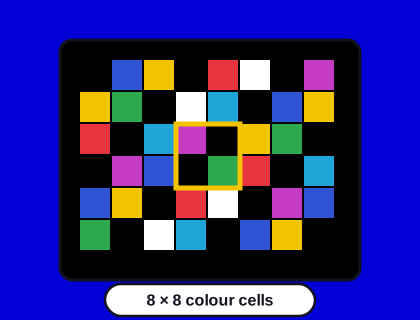
Spectrum colours are set for each 8×8 block, not for each pixel. That one design decision explains colour clash, monochrome games and the Spectrum's whole look.
In short
- The Spectrum's screen is 256 × 192 pixels, divided into 32 × 24 cells of 8 × 8 pixels.
- Each cell can show only two colours at once: an "ink" and a "paper", plus BRIGHT and FLASH settings.
- When a sprite moves into a cell of a different colour, one of them changes colour: that's attribute clash.
- There are 15 distinct colours: eight colours in normal and bright versions, with black the same in both.
- The system saved memory and money, and artists turned its limits into a recognisable style.
How the Spectrum's screen works
The Spectrum stores its screen in 6,912 bytes of memory. The first 6,144 bytes are the bitmap: one bit for each of the 256 × 192 pixels, saying only "on" or "off". The remaining 768 bytes are the attributes: one byte for each 8 × 8 cell, saying what colour the "on" pixels (the ink) and the "off" pixels (the paper) should be.
Storing a colour for every pixel would have needed several times more memory, and memory was the most expensive part of a computer in 1982. Setting colours per cell let the Spectrum have colour at all for its price.
What's in an attribute byte?
| Bits | Meaning |
|---|---|
| 0–2 | Ink colour (0 to 7) |
| 3–5 | Paper colour (0 to 7) |
| 6 | BRIGHT: both colours brighter |
| 7 | FLASH: ink and paper swap over regularly |
The eight colour numbers are 0 black, 1 blue, 2 red, 3 magenta, 4 green, 5 cyan, 6 yellow and 7 white. If you've used Spectrum BASIC, they're printed above the number keys, and the order is no accident: blue, red and green are the three bits of the number.
What is attribute clash?
Imagine a yellow spaceship flying over a red planet. As long as each 8 × 8 cell contains only the ship or only the planet, all is well. But in a cell where both appear, there's only one ink colour available. Either the ship turns red or that piece of planet turns yellow. Move the ship, and the wrong colour moves with it in a blocky square. That's attribute clash, also called colour clash.
It's most obvious in fast games with lots of colourful moving objects, and it became one of the things the Spectrum was teased about in playground arguments with Commodore 64 owners.
How did games avoid it?
- Monochrome play areas. Many games, especially isometric ones like Knight Lore, drew the action in one colour per room. No second colour, no clash.
- Colour in the scenery, not the sprites. Platform games often kept moving characters in the same colour as the background's ink, and put the colour into still scenery.
- Moving in whole cells. Objects that move eight pixels at a time can always line up with the attribute grid.
- Black paper. On a black background, a sprite can take the colour of whatever cell it's in and still look intentional.
- Clever tricks. Later programmers changed attributes in time with the TV's scan line to put more colours on screen than should be possible, a technique sometimes called "multicolour".
Our own games use several of these. Mothfall keeps its cave rock and its sprites on black paper, and reads the attribute colours to decide whether you've touched the rock. Crypt Caper draws each room in one bright outline colour.
BRIGHT, FLASH and the border
BRIGHT makes both colours in a cell more vivid, which is why the Spectrum has 15 colours rather than 16: bright black is still black. FLASH swaps ink and paper about three times a second, used for warnings, cursors and the occasional headache-inducing title screen. The border around the screen can be any of the eight normal colours, and changes colour while loading a tape, as our guide to tape loading explains.
Try it yourself in BASIC
You can see the attribute system at work with a few lines of BASIC, in Speccy or on a real Spectrum. Type this and press Enter after each line, then RUN:
10 INK 2: PAPER 6: CLS
20 PRINT AT 10,10;"CLASH"
30 POKE 22528+10*32+12,64+8*1+7
Line 10 sets red ink on yellow paper and clears the screen. Line 20 prints a word. Line 30 writes straight into the attribute memory, which starts at address 22528, changing the cell at row 10, column 12 to bright white ink on blue paper. Only that one 8 × 8 cell changes: the A in the middle of the word turns white on blue while its neighbours stay red on yellow. A sprite moving across cells like these is what produces attribute clash.
Why the Spectrum's look is still loved
Constraints shaped a style. Spectrum artists learned to draw with two colours per cell, high contrast and detail in black and white, and the results still look distinctive. Modern artists draw "Spectrum-style" pictures on purpose, sticking to the attribute rules. Try making one yourself: our guide to writing a Spectrum game lists drawing tools that enforce them, or see the colours in action in any of our games.
Questions and answers
What is attribute clash on the ZX Spectrum?
Attribute clash happens because the Spectrum sets colours per 8 × 8 pixel cell, with only one foreground and one background colour each. When two colourful objects share a cell, one changes colour. See attribute clash explained.