ZX Spectrum guide
ZX Spectrum 48K vs 128K: What's the Difference?
The 128K Spectrum added memory and a real sound chip. Here is what that changed for games, how to tell which one a game needs, and which to choose in an emulator.
In short
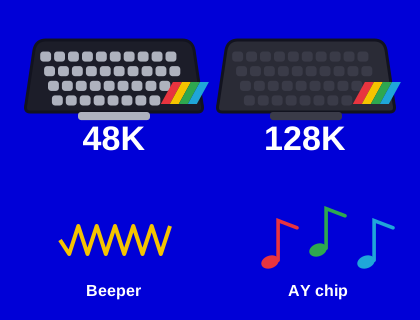
- The 48K has 48 KB of memory and a one-channel beeper. The 128K has 128 KB and adds a three-channel AY sound chip.
- The 128K's extra memory is switched in 16 KB banks, so games must be written to use it.
- Most 48K games run on a 128K; a few need its "48 BASIC" mode or a real 48K.
- 128K-only games use the extra memory for more levels, bigger worlds or music.
- In Speccy, 128K is the default; all seven of our games play AY music on it.
The quick comparison
| 48K | 128K (and +2, +3) | |
|---|---|---|
| Memory | 48 KB RAM | 128 KB RAM, in eight 16 KB banks |
| ROM | 16 KB (48 BASIC) | 32 KB (128 BASIC + 48 BASIC); 64 KB on the +2A and +3 |
| Sound | Beeper (one channel) | Beeper plus AY-3-8912 (three tone channels and noise) |
| Screens | One | Two, so a game can draw on one while showing the other |
| Processor | Z80A, 3.5 MHz | Z80A, slightly faster at about 3.55 MHz |
| Start-up | Straight into BASIC | A menu: Tape Loader, 128 BASIC, Calculator, 48 BASIC |
What the AY sound chip changed
The 48K's beeper is a single speaker that the processor switches on and off. It can play surprisingly clever music, but only by spending almost all of the processor's time on it, so most 48K games play music only on the title screen and simple effects in game.
The 128K's AY-3-8912 is a separate sound chip with three tone channels and a noise generator. Once the processor tells it which notes to play, it plays them by itself. That means proper music, with a melody, a bass line and drums, can play throughout a game. The same chip family was used in the Amstrad CPC, the MSX and many arcade machines, and it gives 128K games their distinctive sound.
You can hear the difference on every game page here: our Apocalypso! and Gemquake pages each have a recording of the 128K soundtrack, and the 48K versions use the beeper.
How the extra memory works
The Z80 processor can only see 64 KB at a time. On the 128K, the top 16 KB of that space is a window, and a game chooses which of the eight 16 KB banks appears in it by writing to an input/output port. The ROM area can be switched too. Using the extra memory takes some planning, so games had to be written specifically for it. Those that were used it for more levels without reloading, larger maps, sampled speech or music.
Why some 48K games don't work on a 128K
Sinclair and Amstrad tried hard to keep the 128K compatible, and it runs the great majority of 48K software. But a few games broke, usually for one of these reasons:
- The game wrote to the memory-paging port by accident, switching banks underneath itself.
- It relied on exact timing that is very slightly different on the 128K.
- It used routines in the 48K ROM at addresses that are different in the 128K's ROM.
Choosing 48 BASIC from the 128K's start-up menu locks the paging and fixes many of these. On the later +2A and +3, a few more games fail because of changes to the hardware.
How do I know which version a game needs?
Inlays and archive listings usually say "48K" or "128K", and many games were sold as "48K/128K", with extra music or levels on the bigger machine. If a game shows "128K only", it won't run on a 48K at all. If you're not sure, try the 128K first, and switch to the 48K if the game crashes or behaves strangely.
Hear the difference yourself
- Open Jelly Storm and press Play. Speccy starts as a 128K, and you'll hear the AY music on the title screen.
- Switch Speccy to 48K. The game reloads, and the title tune now comes from the beeper.
- Start a game on each and listen: on the 128K the march follows the waves, getting faster and higher; on the 48K the beeper plays a two-tone marching beat.
The same test works with any of our games, because all of them detect the sound chip when they start.
Which should I choose in Speccy?
Speccy starts as a 128K, because that gives AY music in games that support it and still runs nearly all 48K games. Switch to the 48K if a game misbehaves. The setting is remembered in your browser. See how to load your own tapes for the details, or read about every Spectrum model, including the +2 and +3.
Which should I buy?
If you're buying original hardware to play games, a 128K-family machine (the 128, the grey +2 or the +2A) gives you the widest choice and the better sound. If you want the classic look and feel, the rubber-keyed 48K is the one. Our guide to buying an original Spectrum covers what to check, and the modern The Spectrum runs both 48K and 128K games.
Questions and answers
What is the difference between the 48K and 128K Spectrum?
The 128K has 128 KB of memory, switched in 16 KB banks, and an AY-3-8912 sound chip with three channels. The 48K has 48 KB and a one-channel beeper. See 48K vs 128K.
Why do some 48K games crash on a 128K Spectrum?
Usually because the game accidentally switches the 128K's memory banks, relies on exact 48K timing, or calls 48K ROM routines that moved. Choosing 48 BASIC from the 128K menu fixes many of them.